


The Advocate
3.7250.00 Reviews
App Specs
- Version
- 4.1.0
- Updated On
- License
- Free
- Downloads
- 50,000+
- Developer
- Georges Media (NOLA, The Advocate)
- Categories
- News & Magazines
- Platform
- Android
Screenshots


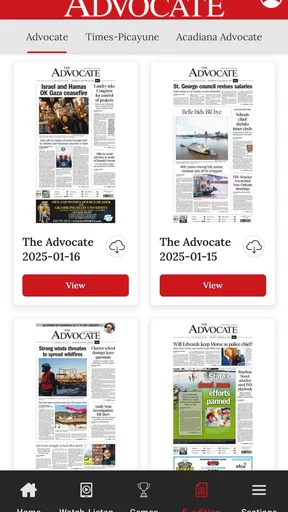
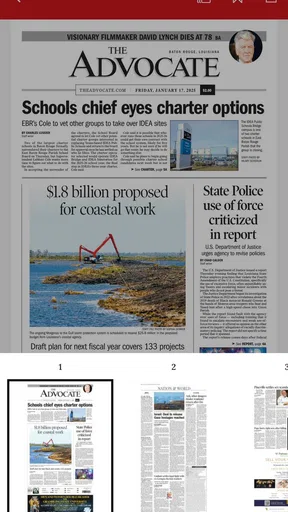

 Analysis by AppCompare
When I open a local news app, I want to understand what is happening nearby without having to fight through a complicated interface. That is the main appeal of The Advocate: it is a free news and magazine app from Georges Media, the publisher associated with NOLA and The Advocate, built around access to current local reporting. It is aimed at readers who care more about regional coverage than a broad stream of generic headlines.
My first impression is that this is best treated as a focused local-news companion rather than a complete replacement for every news source on a phone. It can give your daily reading a clear local center, especially when you want to check what matters in your community before moving on to national or international coverage. At the same time, the overall experience depends on how much local news you actually follow and how comfortable you are with an app that may include paid reading options.
The app is free to install and carries an Everyone age rating, so it is accessible to a wide range of readers. It has been available since May 4, 2012, and its current version is 4.1.0, with Android 8.0 or later required. Those details matter for anyone using an older phone: the app is not aimed at every legacy Android device, but it remains suitable for many people who keep a reasonably current handset.
What to expect from this local news experience
The Advocate sits in the News & Magazines category, but its identity is more specific than that broad label suggests. I would not install it expecting a social feed, an entertainment portal, or a general-purpose news aggregator that treats every region equally. Its value comes from giving local reporting a prominent place in your routine.
That focus changes how I judge it. A national news app may offer more subjects, more international context, and a larger variety of sources in one screen. The Advocate is more useful when the question is, “What is happening around my area?” rather than, “What are all the biggest stories in the world right now?” If local government, community events, regional issues, weather-related developments, or nearby public concerns are important to you, a dedicated local publication can feel more relevant than a large general feed.
The app has a 3.7 average from around 775 ratings, with roughly 250 written reviews. I read that as a mixed but understandable signal: plenty of readers find value in having local coverage on Android, while others may encounter parts of the experience that do not match their expectations. A rating like this is not a reason to dismiss the app, but it is a reminder to judge it by your own reading habits instead of assuming it will suit everyone.
It has passed 50,000 installs, which gives it a meaningful audience without making it feel like an anonymous mass-market utility. I see that as consistent with its purpose. A local publication app does not need to compete with the largest news platforms to be useful; it needs to serve readers who want a particular regional perspective and are willing to return for it.
Worth Reading Before You Choose

EA SPORTS FC Mobile 26 Is a Bigger Football Game, but It Takes Time

Flipboard Shows What News Apps Must Do Beyond the Feed

Switching to Android Auto Means Rethinking Your Driving Routine

Google Calendar Makes a Crowded Week Easier to Manage

Ludo King Makes the Most of the Minutes Between Plans

Baby Panda World Brings Quick Play to Modern Phones, but Its Game Library Feels Busy
One practical expectation is that installing the app does not automatically create a complete news routine. You still need to decide when you will use it and what you want from it. I find local news apps work best when I check them at a deliberate moment, such as during a morning coffee break or after work, rather than opening them repeatedly whenever I feel bored. That approach makes the local focus feel useful instead of turning the app into another source of endless scrolling.
Installing it without overcommitting
Because the download is free, the safest approach for a first-time user is to treat the installation as a short trial. You do not need to decide immediately that it will become your only news source. Install it on a compatible Android device, open it when you have a few quiet minutes, and see whether the local coverage matches the place and subjects you care about.
The minimum operating system is Android 8.0. Before troubleshooting the app, I would check that basic requirement, especially if the phone is older or has not received updates for a long time. If the device meets it, the next useful step is simply to explore the opening screen calmly rather than judging the app from the first headline alone.
I also recommend deciding in advance whether you are comfortable with optional spending. The app itself is free, but its listed in-app purchases range from $19.99 to $149.99 per item. That does not mean every reader must pay, and it does not mean every screen will require a purchase. It does mean you should read any subscription or purchase prompt carefully, understand what it offers, and avoid tapping through quickly if you only intend to browse free material.
This is one of the most important first-use habits with a publication app: separate the act of installing it from the decision to subscribe. I would first learn how the app presents its articles and whether the coverage is relevant to me. Only then would I consider paying for continued access. That two-stage approach prevents a free download from becoming an accidental commitment.
Finding a first meaningful result
My definition of success with this app is not merely opening it. A useful first session ends when I find one local story that answers a question I genuinely had, gives me context about something nearby, or points me toward an issue I want to follow. That makes the trial concrete: instead of asking whether the design is perfect, I can ask whether the reporting earns a place in my day.
For example, imagine checking the app before leaving for work because you want to know whether a local event, public decision, or developing regional story could affect your plans. I would scan the main presentation, open the item that seems most directly connected to my area, and read far enough to decide whether the article is useful rather than jumping between every headline. If it gives me a clearer understanding of what is happening locally, the installation has already proved its basic value.
A second practical use is building a short evening routine. Instead of opening several unrelated news services, I might use The Advocate as the local portion of my reading: first check regional developments here, then use another source for national or international context. This division of labor is more efficient than expecting one app to cover every level of news equally well.
There is also a useful distinction between browsing and following. Browsing means opening the app when something catches your attention. Following means returning with a specific question or local interest in mind. The latter is usually more rewarding. If you care about a community issue, keep that subject in mind when you return and look for how coverage develops over time. Even without treating the app as an all-purpose archive, a repeated local perspective can help you notice changes that a one-time visit would miss.
For readers who are new to local news apps, I would avoid trying to understand every part of the interface during the first session. Start with the front page, open one relevant article, and decide whether the writing and coverage feel worthwhile. That simple path reduces the usual first-use confusion and gives you a meaningful answer quickly.
Where the experience can feel unclear
The biggest source of hesitation is likely to be the boundary between free access and paid content. Publication apps often mix open reading with subscription prompts, and the presence of in-app purchases makes it especially important to pause when a payment screen appears. If you are only testing the app, look for the option that lets you continue without subscribing when one is offered, and read the wording rather than assuming the button you notice first is the only route.
I would also avoid interpreting every locked or promotional element as a technical failure. A publication app may be presenting a paid reading choice rather than malfunctioning. The right response is to decide whether that article or service is worth the cost, not to repeatedly tap the same control. If the free portion does not give you enough value, that is useful information about fit.
Another possible confusion is the difference between local relevance and personal location. A local publication can be highly valuable to someone who lives in the area it covers, but less useful to a traveler or a reader who wants several regions in one place. If your main need is nationwide breaking news, a broad news reader will probably be the better first installation. The Advocate makes more sense when its regional perspective matches your everyday life or a place you follow closely.
Readers may also wonder whether a publication app should replace a browser. In my view, it does not have to. The app is convenient when you want a dedicated reading space and a direct route into the publication’s coverage. A browser can still be better when you are searching for a very specific older article, comparing several publishers, or reading from a device where you do not want another app installed. Using both is not a failure of the app; it is a sensible division between routine reading and open-ended research.
The rating also suggests that expectations should remain realistic. The app has been around for years, but longevity does not guarantee that every reader will find the interface equally smooth or that every update will feel identical on every phone. I would judge it by the practical outcome: can I reach relevant local reporting without unnecessary friction? If the answer is yes, minor imperfections may be acceptable. If the app repeatedly interrupts the basic act of reading, a mobile browser or another local source may suit me better.
Small habits that make it more useful
One useful habit is to give the app a specific role in a larger news routine. I would not ask it to provide my entire worldview. Instead, I would use it for local awareness, then consult a separate source when I need broader political, business, science, or international context. This avoids the common mistake of judging a regional publication for not behaving like a global aggregator.
A second habit is to read one article completely before opening several more. Local stories often make more sense when I give them enough attention to understand the people, places, and consequences involved. Rapidly collecting headlines can create the impression that I have caught up when I have only skimmed fragments. The app is more valuable when I use its local focus for understanding, not just speed.
A third trade-off involves paid access. If I return often and consistently find reporting that affects my decisions or helps me understand my community, considering an in-app purchase may be reasonable. If I open the app only occasionally, the free experience may be enough, provided it meets my needs. The listed purchase range is wide, so I would never assume that a single price represents every option; I would inspect the exact offer and its terms before confirming anything.
It is also worth keeping the app’s age rating in perspective. The Everyone rating makes it broadly accessible, but adults should still decide whether the news topics are appropriate for a particular child or family setting. An age label describes general suitability; it does not replace a parent’s judgment about current events or difficult subjects appearing in news coverage.
Who should install it, and who should skip it
I would recommend giving The Advocate a try if you live in the community it serves, have family or work connections there, or want a regional source that is easier to check than a collection of scattered web pages. It is also a good candidate for readers who prefer a publication’s own editorial focus over a feed assembled from many unrelated outlets.
I would be more cautious if you want a single app for every kind of news. The local emphasis is a strength only when it matches your needs. Someone who mostly follows international events, technology headlines, markets, or national politics may find a larger news service more efficient. Likewise, readers who refuse all subscription prompts may prefer a source with a clearly free model, even if that means giving up some publication-specific coverage.
It may also be the wrong choice if your phone cannot run Android 8.0 or later. In that situation, the limitation is compatibility rather than a problem with the reporting itself. Checking the operating system before spending time troubleshooting is the quickest way to avoid frustration.
My balanced view is that this app succeeds when I use it intentionally: open it for local awareness, read with a question in mind, and treat payment prompts as decisions rather than obstacles to rush through. It is less convincing as a universal news replacement, and its average rating suggests that the experience will not satisfy every reader equally. Still, its focused purpose gives it a clear reason to exist.
My next-step recommendation
If you are curious, install the free app and make your first session short and specific. Confirm that your Android version is compatible, look through the opening selection, and choose one story connected to your everyday interests. The first meaningful test is whether that article helps you understand something local better than a general news feed would.
After that, return once or twice at a time when you normally check news. Notice whether the coverage remains relevant, whether the reading flow feels comfortable, and whether paid prompts affect the way you want to use the service. Do not subscribe simply because the download was free; decide only after you know that the publication has earned a regular place in your routine.
For me, the strongest reason to keep The Advocate installed would be dependable access to local perspective, not the promise of unlimited variety. I would pair it with a broader source for national and international stories, using each tool for what it does best. If that sounds like your ideal setup, this free News & Magazines app is worth trying. If you want one neutral, all-purpose feed with no regional emphasis, another option will probably be a better match.
Overall, The Advocate is a focused Android news app from Georges Media that offers a straightforward starting point for local reading. Its free entry, Everyone rating, established presence, and regional purpose make the trial easy to justify. The real question is personal: does local reporting deserve a regular place in your daily reading? If the answer is yes, the app can become a useful first stop; if not, its narrow focus will feel more like a limitation than an advantage.
Pros
- Clear reporting helps users follow major legal and political developments.
- Well-organized sections make browsing articles quick and straightforward.
- Opinion pieces offer varied perspectives on current public affairs.
- Articles are generally easy to read on a mobile screen.
- Useful for readers seeking an Australian-focused news source.
Cons
- Coverage may feel limited for readers seeking international news.
- Some opinion content can be more prominent than straight reporting.
- The app may require notifications to be adjusted for a quieter experience.
- Certain articles may feel lengthy when read on a phone.
- Availability and features can vary by region or app version.
FAQs for The Advocate
What is The Advocate app used for?
The Advocate is designed to keep users informed about LGBTQ+ news, culture, politics, entertainment, and community issues. From my experience reviewing the app, it works best as a convenient way to browse current articles and opinion content in one place. The exact topics and availability of stories may vary depending on your region and the publication’s current editorial coverage.
Is The Advocate free to download and use?
The Advocate can generally be downloaded without an upfront charge, but access to all content may depend on the app’s current subscription model. Some articles or features may be available freely, while premium stories, archives, or additional benefits could require payment. Before subscribing, check the in-app pricing, renewal terms, and whether your platform offers a trial period.
Does The Advocate require an account or subscription?
Basic browsing may not always require an account, although registration can provide a more personalized experience and may be necessary for saving content or accessing restricted articles. A subscription could also be required for premium material. I recommend reviewing the sign-in screen and subscription details carefully, especially the automatic-renewal conditions, cancellation process, and supported payment methods.
Can I read The Advocate articles offline?
Offline reading depends on the version of the app and the features enabled for your account. In my review, users should not assume that every article can be downloaded for later use unless the application clearly provides a save or offline option. If offline access is important to you, verify this feature in the current app description and settings before downloading.
Is The Advocate available on both Android and iOS?
The Advocate may be offered through official mobile app stores, but availability, supported devices, and feature sets can change over time. Before installing, search for the official publisher listing on Google Play or the Apple App Store and confirm the developer name. Avoid unofficial downloads, as they may be outdated, modified, or unsafe, and always check compatibility with your device.


